Before and after
Five things OSOS asks a caseworker to do, and what this rebuild does instead. The left-hand side of every pair is quoted from a guide NYSDOL publishes, with the page linked, and the screenshots on that side are the images NYSDOL put in those guides. Nothing here is redrawn, re-staged, or paraphrased.
OSOS spans three generations of interface, and a guide’s date does not tell you which one it shows. No pair claims otherwise: each caption gives the guide and its footer date, and what era the screen belongs to is visible in the screen.
Recording that someone is not a US citizen
OSOS requires an Alien Registration Number, has no way to record that nobody collected one, and so the guide supplies a number to type instead.
OSOS, as published
This information is not collected in OSOS. Enter "Z999999999" for the customer's Alien Registration Number. When entering the Expiration Date, enter a date in the very distant future, such as "12/31/2199."
OSOS Creating a Basic Customer Record p.7 · 2024-10-15
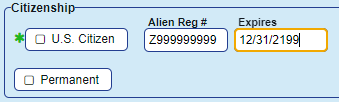
The guide's own screenshot of the result. Every non-citizen record in OSOS carries the same nine-digit number and the same expiry date in the twenty-second century.
This rebuild
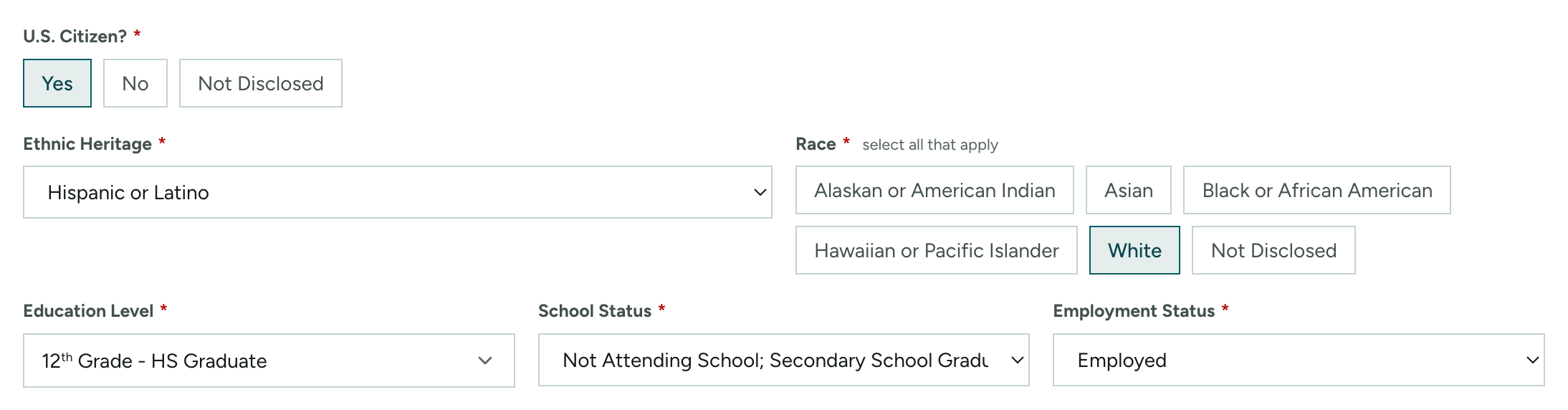
Not Disclosed is one of the three answers. Nothing downstream has to guess whether Z999999999 means a real registration or a missing one, because it is never entered.
/customers/[id]/general-info
This is not a technical limit. It is an inconsistency.
One field higher on the same OSOS screen, in the same guide, on the same page, OSOS models exactly this: an SSN panel with a Not Disclosed box. The software can already say “we did not collect this.” It simply is not wired to the citizenship fields — and the guide fills the gap with a constant rather than the state fixing the field.
OSOS’s own SSN panel
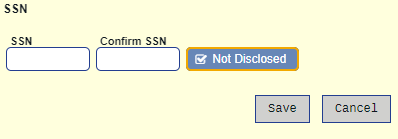
The same idea, applied everywhere
Filling in a field that does nothing
Two fields on the first screen of every new record are, by NYSDOL's own account, no longer connected to anything — and are still required before the record will save.
OSOS, as published
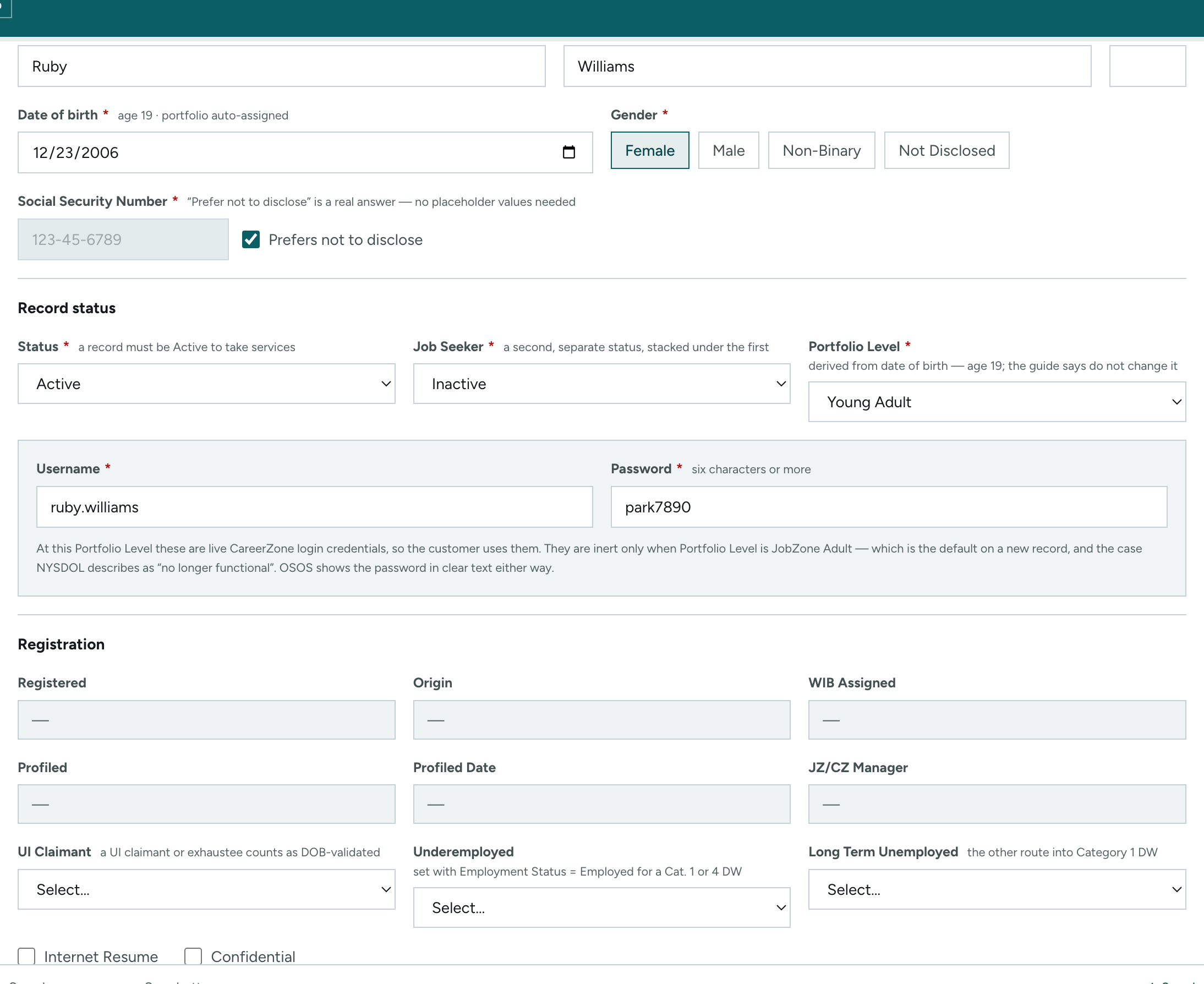
Username and Password: For all JobZone Adult customers, these fields are no longer functional for JobZone purposes, but data must be entered here to complete the customer record.
OSOS Creating a Basic Customer Record p.7 · 2024-10-15
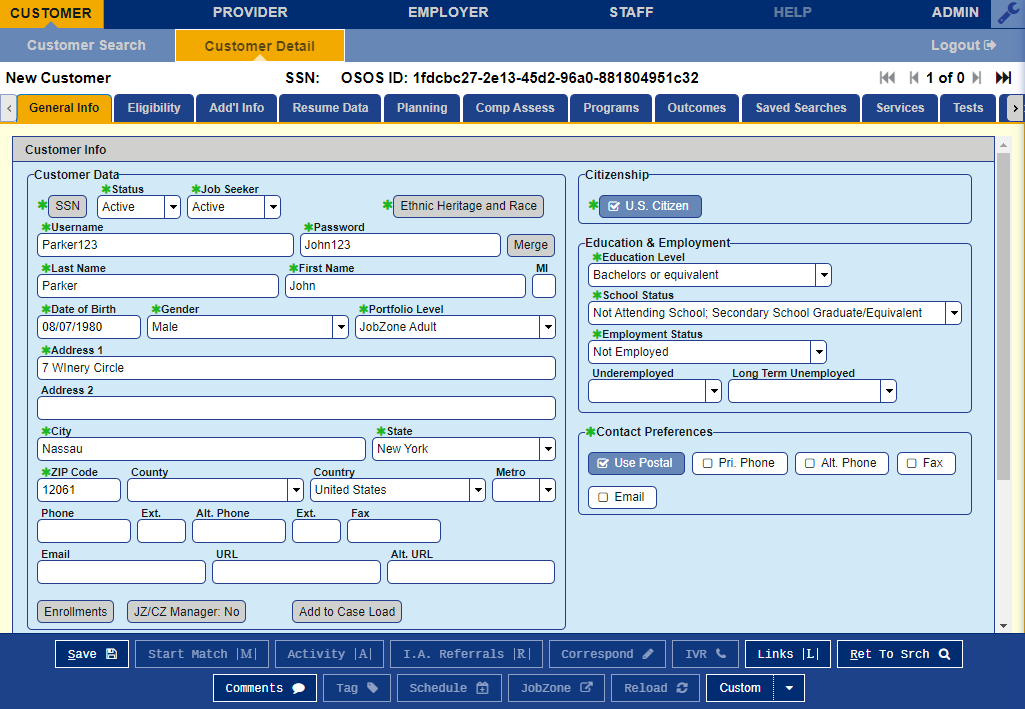
The guide's filled-in example: Username “Parker123”, Password “John123”, shown in clear text on the record. The instruction above has survived three revisions of this guide, including the 2018 edition.
This rebuild

The fields are still here, and the screen says what they are: live CareerZone credentials at one Portfolio Level, inert at the other, quoting NYSDOL's own phrase.
/customers/[id]/general-info
Where this one is narrower than it looks
This is the narrowest win on the page and it should not be oversold. The fields are not removed — they are OSOS's fields and this is a rebuild of OSOS, so taking them out would make the demo wrong. What changed is that a caseworker typing into them can now find out, on the screen, whether what they type will do anything. OSOS shows the password in clear text; so does this, because that is the field OSOS has.
The same person, entered twice
OSOS has no merge. Fifteen separate guides tell staff that the answer to a duplicate record is an email to the help desk.
OSOS, as published
As a best practice, staff should perform a name search for any customer they are working with to determine if duplicate OSOS records exist for the same customer. If a duplicate record is found, please email help.osos@labor.ny.gov with both record ID's.
OSOS Quest Guide p.5 · 2024-10-29
There is no screenshot on this side because there is no screen. The duplicate control in OSOS is a caseworker remembering to search first, and an email address. Until someone answers it, one person has two case histories that each tell half the story, and any report reading one of them alone is wrong.
This rebuild
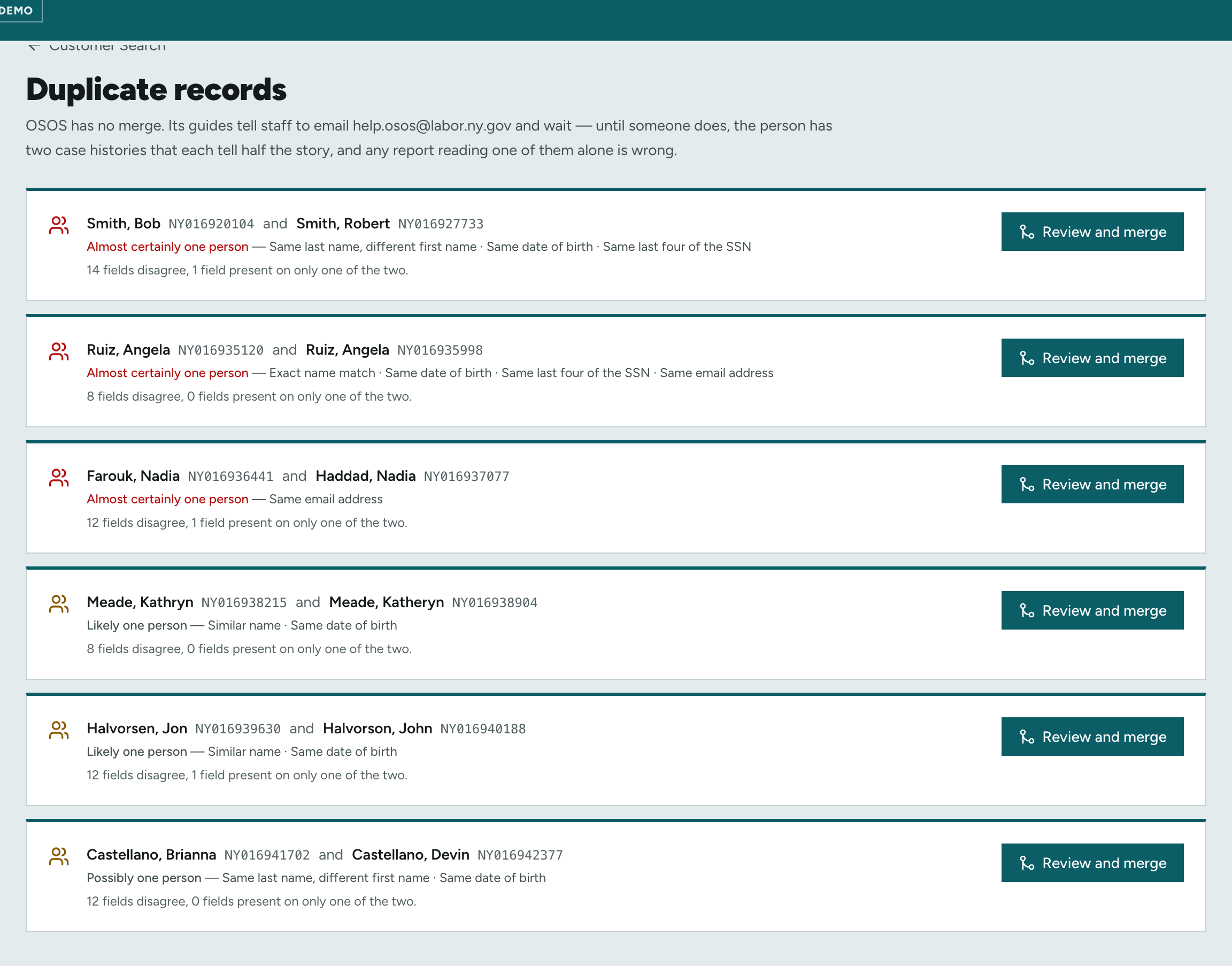
The check runs over the caseload and says why it fired — same last name, same date of birth, same last four of the SSN — then counts what actually disagrees before anybody merges anything.
/customers/merge
Choosing which columns you see
OSOS's column picker is around ninety checkboxes in a scrolling dialog, each with a number box beside it, and it is the numbers rather than the ticks that decide the column order.
OSOS, as published
Seeker Name and Date of Birth are recommended because they help identify duplicate OSOS records.
OSOS Performing a Customer Search Guide p.5 · 2024-10-15
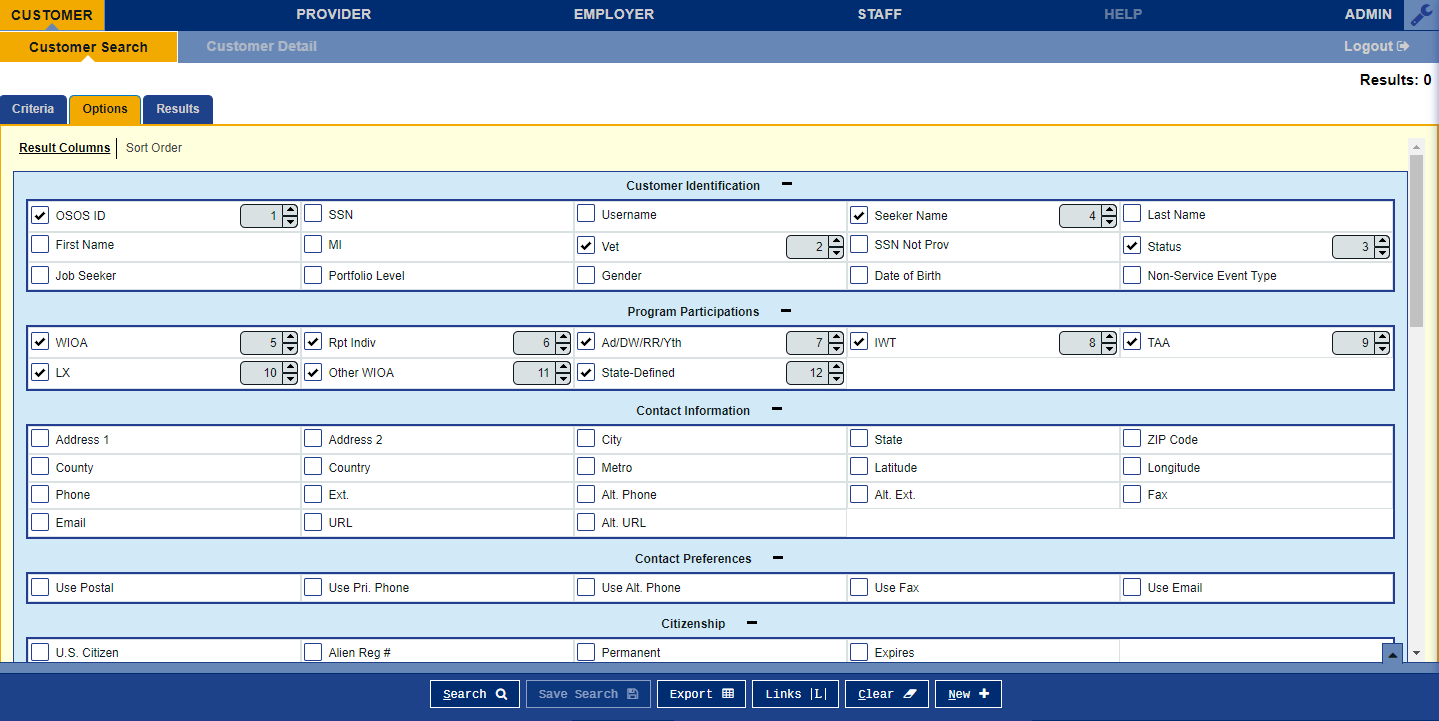
Options ▸ Result Columns. Note what the guide has to explain here: two of these columns matter because together they are how a caseworker spots the duplicate that OSOS will not spot for them.
This rebuild
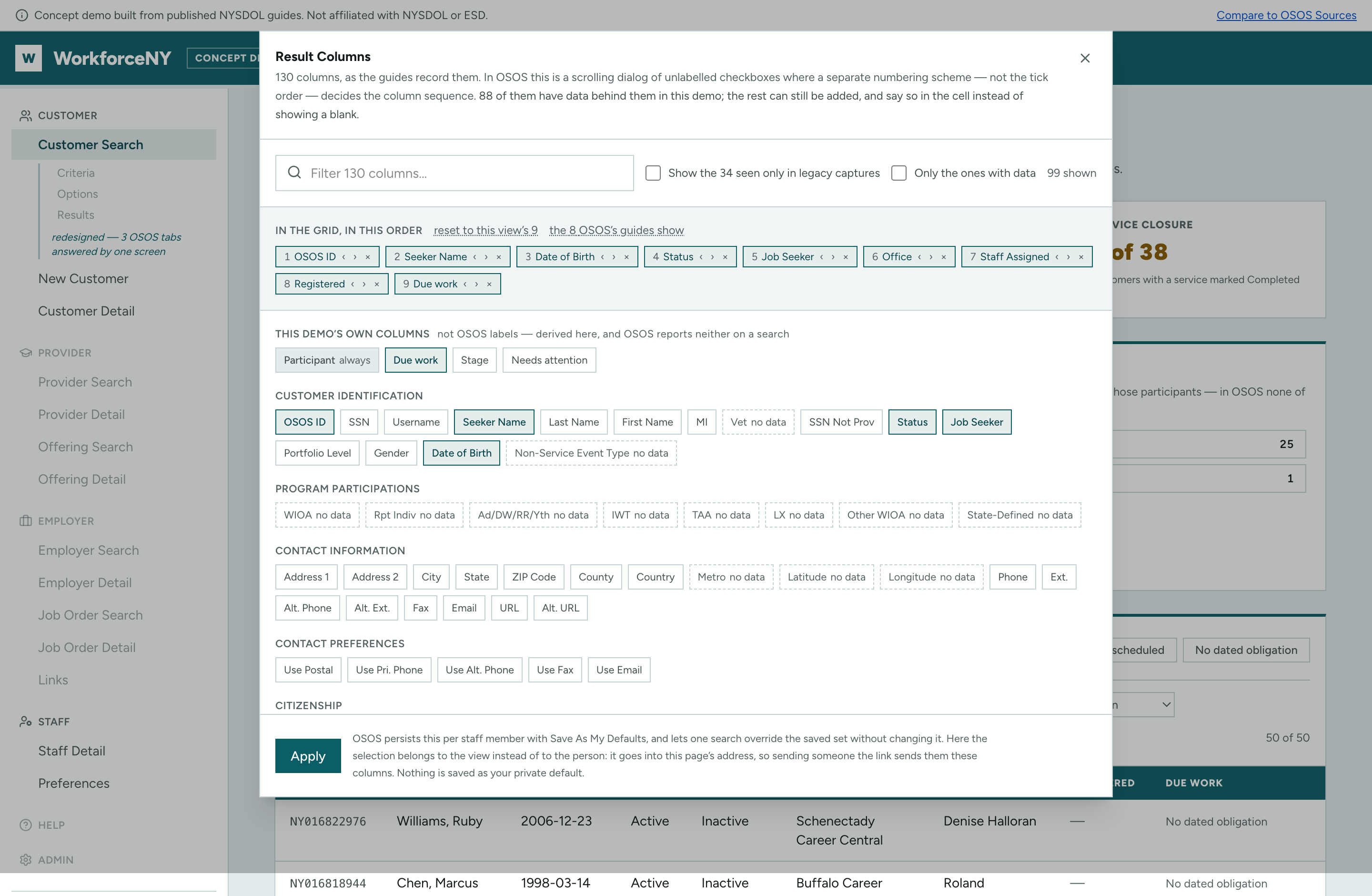
The same 130 columns, filterable, grouped the way the guides group them, with the chosen order shown and reorderable instead of typed into number boxes. Columns this demo has no data behind are marked before you pick them.
/
Creating a record for someone standing in front of you
OSOS will not save a new record until six tabs are complete, which is why its guides tell staff to type placeholder values into fields that do not apply.
OSOS, as published
In the Employment Objective field write N/A.
OSOS Empire State Development (ESD) Guide p.20 · 2026-01-27
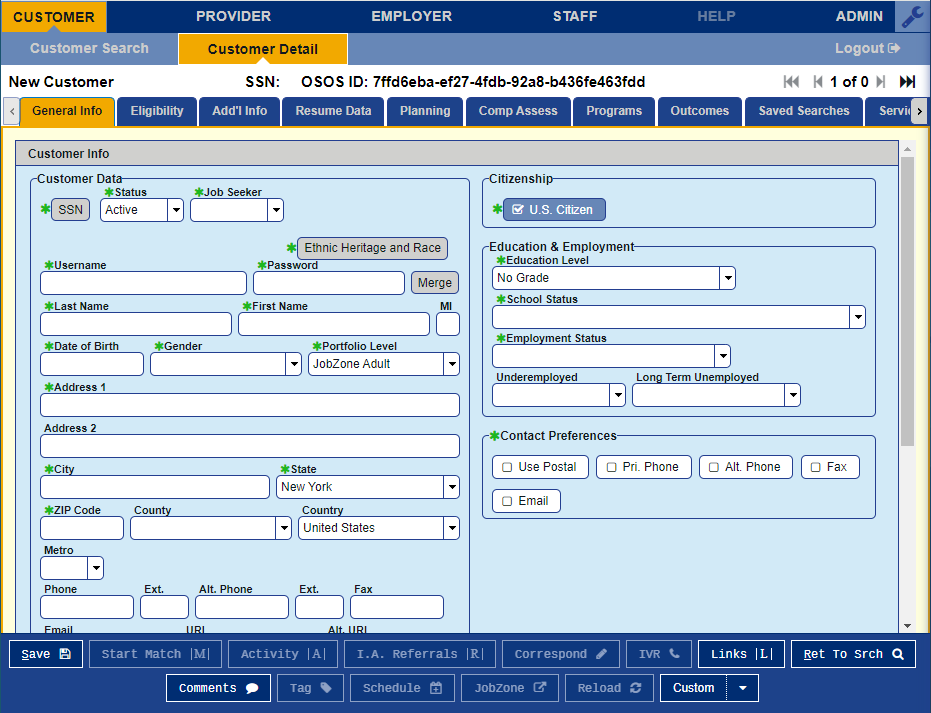
General Info, the first of the six. The quote is from a different screen in the same workflow and is the shape of the whole problem: when every tab must be complete, the way to finish is to write something that is not true.
This rebuild
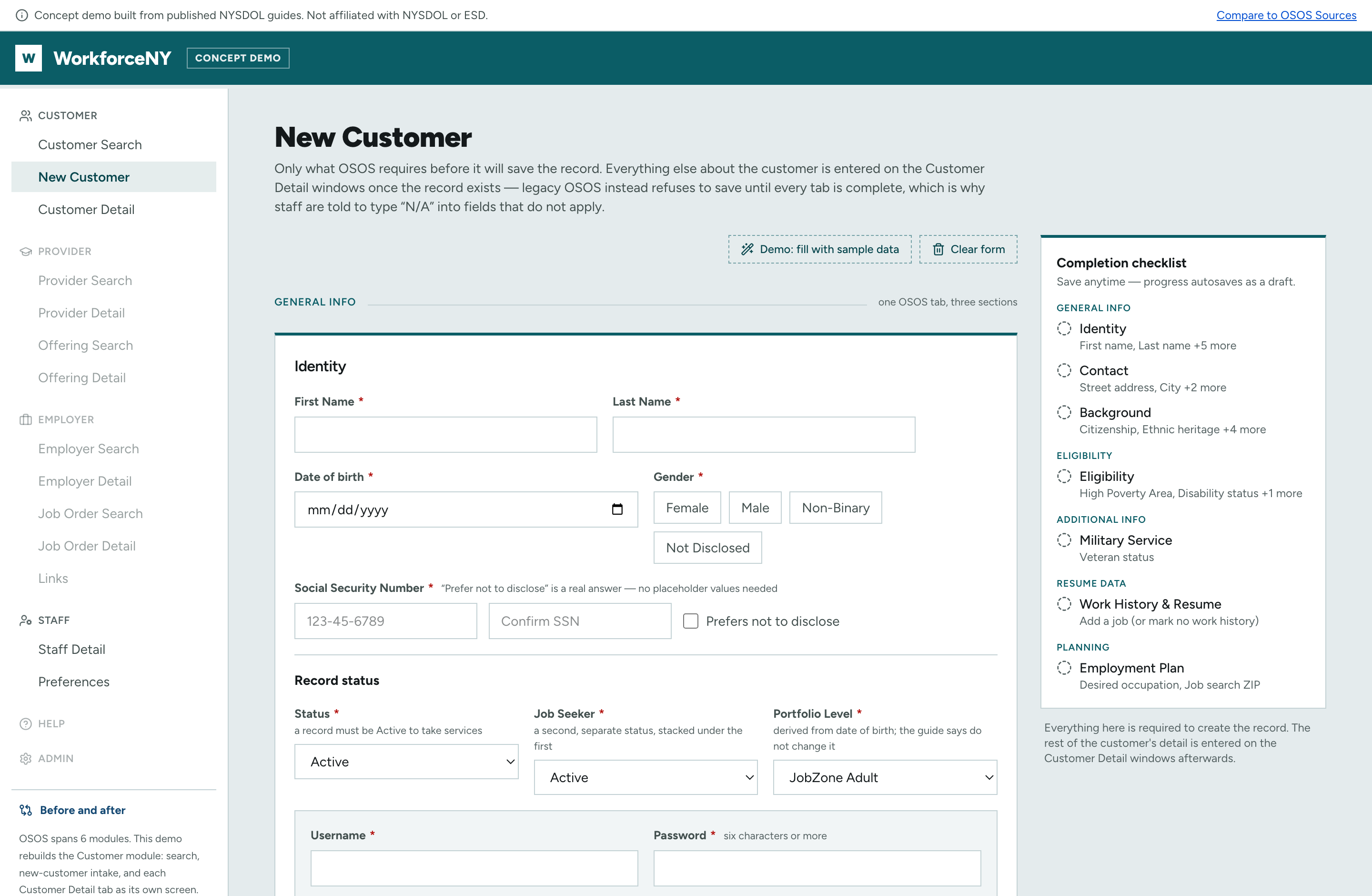
One form, and only the fields OSOS genuinely requires before it will save. The checklist on the right is the same requirement, stated up front instead of discovered on submit. Everything else about the customer is entered afterwards, on the window it belongs to.
/customers/new
In the state’s own words
These are not complaints about how OSOS looks. Each one is an instruction NYSDOL publishes, telling staff to enter something that is not true, fill a field the same guide calls non-functional, or keep a record somewhere the system cannot hold it.
11 of 42 found across 1,861 pages of 80 published guides. The rest are in sources/howlers.tsv with the same citations. Every quote is re-read off the page it cites by gen-howlers.py --check, which fails on a single changed word.
In its own words
“SSN: The customer's Social Security Number is not required, but the field is required to be completed.”
OSOS Creating a Basic Customer Record p.7 · 2024-10-15
Handled differently on
/customers/[id]/general-infoFill a field that does nothing
“Username and Password: For all JobZone Adult customers, these fields are no longer functional for JobZone purposes, but data must be entered here to complete the customer record.”
OSOS Creating a Basic Customer Record p.7 · 2024-10-15
Handled differently on
/customers/newEnter something untrue
“This information is not collected in OSOS. Enter "Z999999999" for the customer's Alien Registration Number. When entering the Expiration Date, enter a date in the very distant future, such as "12/31/2199."”
OSOS Creating a Basic Customer Record p.7 · 2024-10-15
Handled differently on
/customers/[id]/general-infoEnter something untrue
“Check the box for Monday as the day of the week that the training will start, regardless of when the training will start.”
OSOS Creating Providers, Services, and Offerings Guide p.14 · 2025-02-28
Handled differently on
/customers/[id]/servicesIn its own words
“Sensitive information is masked within the Excel file so that it is not shared unintentionally.”
OSOS Correspondence Guide p.9 · 2026-08-04
Handled differently on
/customers/[id]/correspondenceEnter something untrue
“To do this, enter $1.00 in the Total Funding field. Click the Add button. OSOS is not used as a financial tracking system. It is only used to track programmatic services provided. For this reason, the $1.00 entry acts as a placeholder so that the system will designate a funding source to be attached to the service. This allows the system to track services provided under this funding.”
OSOS Supportive Services and Other Allowable Participant Support... p.28 · 2026-03-27
Handled differently on
/customers/[id]/servicesEnter something untrue
“Wage is a required field. Homemaker is typically an unpaid position, entering $0.01 in the Wage field and Other in the Unit drop-down field is acceptable.”
Displaced Homemaker Program - OSOS Guide p.9 · 2025-03-04
Handled differently on
/customers/[id]/resume-dataEnter something untrue
“The wage entered in this section cannot exceed 87500, so if your customers wages are over 87500, please enter 87500 in the Manual Wage Amount and then include a comment with their actual wage amount in the Notes section.”
OSOS WIOA Performance Measures and Outcomes Guide p.23 · 2025-07-18
Handled differently on
/customers/[id]/outcomesEnter something untrue
“In the Employment Objective field write N/A.”
OSOS Empire State Development (ESD) Guide p.20 · 2026-01-27
Handled differently on
/customers/[id]/planningNowhere to put it
“When unsure if the confidentiality of the information may be sufficiently protected, do not enter it into the text box. Instead note "See hard copy in file" and keep the file in a locked drawer.”
Displaced Homemaker Program - OSOS Guide p.18 · 2025-03-04
Handled differently on
/customers/[id]/comp-assessCannot be undone
“Not Really an Error Message”
Webinar Powerpoint: My Case Load p.44 · 2021-03-01
Handled differently on
/staff/case-load